
SEO Basics for Editors: Getting the Fundamentals Right

The internet is abundant with information about SEO. Everyone seems to be an expert or have an opinion (including us now with this blog). But most of this volume is targeted at developers or writers. There’s very little on SEO basics for editors. And that’s where we come in.
You might want to launch your own editing services website, but want to get a handle on the SEO thing first. Maybe you exaggerated your skills slightly to a client and are now looking at how to implement SEO on the fly. Maybe you’re just curious. Regardless, we hope this guide helps you get the fundamentals right.
Table of Contents
What is SEO and Why Should Editors Care?
Search Engine Optimisation, or SEO for short, is the practice of optimising websites and online content so it ranks well on search engines like Google. The goal is to get your content featured on at least the first page of the Google Search Results Page (SERP), if not at the top.
There are two main types of SEO:
- On-page SEO is anything on your website that you can optimise.
- Off-page SEO is anything external to your website that can influence your rankings. This includes guest posts on other websites, backlinking, social media content, and PR.
Now, what does any of this have to do with editors? Because it sounds a bit technical. More number-ish than word-ish.
Here’s the thing: High-quality, well-written content is a vital part of an SEO strategy – it’s where SEO and editing meet. Posting unedited AI-created content hinders SEO, while content written by (or at least edited by) a human will get you the results you’re after.
For editors, SEO isn’t just about adding keywords. It’s about structuring content so it’s clear, engaging, and easy for readers and search engines to understand. Well-optimised articles attract more traffic, keep readers on the page longer, and signal credibility to search engines.
How Do Search Engines Work?

Search engines, such as Google and Bing, process and sort information online at lightning speed. There are three steps to the process: crawling, indexing, and ranking web pages.
1. Crawling
Search engines “crawl” the web. This means they search online for new pages to add to the relevant lists of known pages (since no central database exists). Pages are discovered through links on crawled pages, category pages, or sitemap submissions for indexing.
2. Indexing
Once the search engine has found a new page, it needs to figure out what the page is about. This is known as indexing the page, including “processing and analysing the textual content and key content tags and attributes, such as <title> elements and alt attributes, images, videos, and more.”
During indexing, the search engine identifies duplicate pages and selects a canonical version to display in search results. It groups similar pages and chooses the most representative one. It may show alternates in specific contexts, like mobile searches.
3. Ranking
Finally, the search engine determines which pages are served in what order on the SERP. This ranking depends on a page’s authority and relevance, i.e. is it best suited to the search term the searcher used.
“Relevancy is determined by hundreds of factors, which could include information such as the user’s location, language, and device (desktop or phone).”
5 Key SEO Concepts Editors Should Know
Before taking the plunge into SEO waters, let’s equip you first.
1. Keywords
Keywords are possibly the most important aspect of SEO, as they inform search engines about a page’s content and assist with matching the content to relevant search queries. This means if you carefully align your keywords with user intent, you’ll increase your visibility in the SERPs.
So, how and where do you use keywords? In the big picture, they can help you create a content strategy as they’re useful for determining your audience’s specific questions or needs.
In the content itself, it’s important to include keywords in titles, headings, and body text to signal relevance. But avoid overusing your chosen keywords if you wish to maintain readability and search engine compliance (more on this later).
Core Keyword Research Methods
- Brainstorming: This is a great first step for keyword research. Choose a topic that’s relevant to your client or website, and put your thinking cap on. For example, you’re writing for a mountain guiding company in Cape Town. You choose the topic “Best walks in Cape Town”. Ideas similar to this could be “Best hikes in Cape Town”, “5 Must-do walks in Cape Town”, “Best coastal walks in Cape Town”, or “Top Table Mountain adventures”.
- Competitor analysis: Look at what keyword(s) your competitors are targeting. Check out their topics or use a keyword research tool to analyse what keywords they’re ranking for. Tools like Semrush’s Organic Research tool, Google Ads’ Keyword Planner, or Neil Patel’s Ubersuggest can help.
- People Also Asked: If you’re struggling to find keywords that aren’t oversaturated, look for similar or related topics by using Google’s People Also Asked section on the SERP or the Also Asked website.
What is Search Volume and Competition in Keyword Research?
Search volume refers to the number of times a keyword is searched within a specific timeframe (usually monthly). A high search volume indicates strong interest in a topic, while a low search volume suggests limited demand. The sweet spot is keywords with enough searches to drive traffic but not so broad that ranking becomes difficult.
Competition measures how many websites are targeting the same keyword. High-competition keywords are harder to rank for, as many established sites already cover them. Lower-competition keywords offer a better chance of ranking, especially when paired with relevant, high-quality content.
For example, “hiking in Cape Town” may have a high search volume but strong competition. A more specific phrase, like “best sunset hikes in Cape Town”, might have lower competition while still attracting interested readers.
How to Conduct Basic Keyword Research
Let’s put all of this information into action. A simple approach starts with brainstorming a few primary topics. For example, an editor writes a piece of content about hiking in Cape Town. They start with “best hiking trails in Cape Town”.
Using free tools like Google Keyword Planner or Ubersuggest, they can check search volume and competition. If a keyword is highly competitive, they can refine it to something more specific like “beginner-friendly hiking trails in Cape Town”.
Once they’ve gathered a list of potential keywords, the editor integrates them naturally into headings, subheadings, and body text without overusing them. This way, the editor maintains readability while helping search engines understand the content.
2. Meta Descriptions
Meta descriptions provide a summary of a page’s content, helping users decide whether to click on a search result. While they don’t directly impact rankings, they influence click-through rates (CTR) by making listings more attractive.
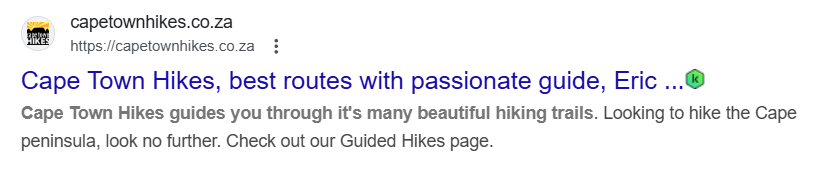
Best Practices for Writing Meta Descriptions:
- Keep it concise: Meta descriptions should be around 150-160 characters to ensure they display fully in search results. Too-long descriptions get cut off with ellipses […].
-
- Make it clear and specific: Summarise the page’s content accurately, focusing on key points that matter to the reader.
-
- Incorporate relevant keywords: Use primary keywords naturally to signal relevance, but avoid keyword stuffing.
-
- Match Search Intent: Address what users are looking for by highlighting solutions, benefits, or important details.
-
- Use the active voice: Write in a direct, engaging manner that encourages users to take action.
-
- Include a Call to Action: Phrases like “Learn more”, “Get started”, or “Shop now” can prompt users to click.
-
- Avoid duplication: Each page should have a unique meta description that reflects its specific content.
-
- Ensure readability: Keep the language simple and easy to understand while maintaining a professional tone.
Including a keyword in a meta description helps search engines and users quickly understand a page’s relevance.
The keyword should fit naturally within the text, making the description clear and readable. Instead of forcing placement, it should blend into a sentence that accurately summarises the content.
For example, a page about hiking in Cape Town might have a meta description like: “Explore the best hiking trails in Cape Town, from scenic coastal walks to challenging mountain routes with breathtaking views.” This makes sure that the keyword adds value without sounding unnatural or repetitive.
3. Content Structure
Every editor knows that well-structured content improves readability and keeps readers engaged. Headings (H1, H2, H3) break up text, guiding users and search engines through key sections.
Bullet points highlight important details, making information easier to scan. Shorter paragraphs enhance clarity, preventing large blocks of text from overwhelming the reader.
Example: Hiking in Cape Town
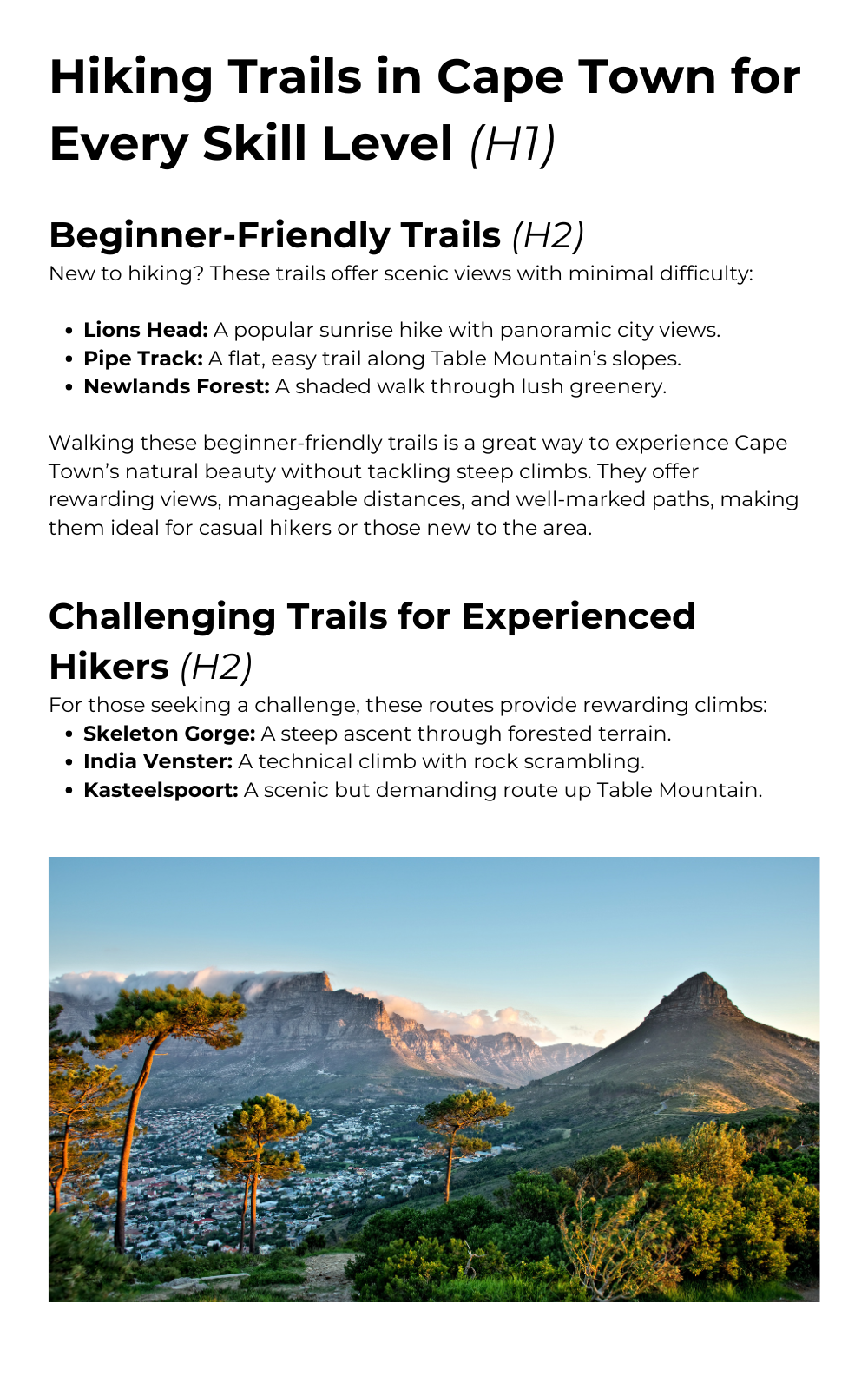
4. Internal and External Links
Internal links connect different pages within the same website. For example, you can link between your blogs, product/service pages, resource pages, and contact pages. This helps users navigate related content and distributes link authority across pages, improving SEO performance.
External links to reputable sources build credibility and trust, showing that the content is well-researched and reliable.
Both types of links enhance user experience by providing valuable information and context.
Nuances of Linking
- Opening links in a new tab: When you link to external websites, your settings should say “open in a new tab”. This ensures your readers stay on your site (no traffic loss for you) while perusing the linked material in a new tab. If your content management system allows it, mark any external links as “no follow” to ensure accurate performance tracking.
- Avoid linking spaces: Links should always be placed in relevant text, not empty spaces or images. So, link like this and not this. Your readers must understand the connection and engage with the content meaningfully.
- Anchor text: Anchor text is the actual words you attach the link to. Don’t use generic phrases like “click here”. Anchor text should clearly describe what the linked page offers, such as “best hiking trails in Cape Town”. This improves user experience and SEO.
For example, a page about hiking in Cape Town might include a link to a specific trail: “For more information on Lions Head, check out our detailed guide on the best time to hike Lions Head.” The anchor text is informative and relevant, guiding users to additional content while helping search engines understand the topic.
5. Alt text
Alt text, or alternative text, refers to text that describes an image online. Search engines cannot “see” images, so they rely on alt text to understand what’s depicted.
For editors, this means making sure your website has well-named image files and clear alt text if you want to show up in relevant search results.
But most importantly, alt text helps users with disabilities, as screen readers can describe the image content through alt text.
Example: Lion’s Head

- Photo by Janet Barben
For this image of Lion’s Head, taken from Table Mountain, alt text could be:
“A view of Lion’s Head and Camps Bay from the Upper Pipe Track on Table Mountain in Cape Town.”
This alt text clearly describes the image, includes relevant keywords like “Table Mountain” and “Cape Town”, and provides context for users and search engines.
How Editors Can Optimise Content for SEO

Now that you’ve got the basics down, you can use this cheat sheet to optimise online content for SEO.
Research Keywords
Editors can improve SEO by identifying relevant keywords via research tools like Google Keyword Planner or SEMrush. By understanding what terms users search for, you can integrate these keywords into content. Just ensure they fit naturally.
Example: An article about hiking in Cape Town could target terms like “best hiking trails” or “Table Mountain hike”.
Improve Readability
Content should be concise and well-organised to keep readers engaged. It’s best to use clear and simple language while avoiding overly complex sentences. A logical flow of ideas, proper paragraph breaks, and bullet points, where necessary, make the content easier to follow.
Example: A detailed hiking guide can be divided into clear steps or sections to help users quickly find the information they need.
Ensure Accuracy and Relevance
Editors can regularly review content to ensure the information is up-to-date and relevant.
This is especially important for topics like hiking, where trail conditions or access information may change. An outdated guide to Cape Town’s hiking trails could mislead users and harm SEO performance.
Use Authoritative Sources for Backlinks
Linking to reputable, authoritative sources improves credibility and SEO. Be sure that any backlinks in the content come from trusted websites.
Example: Linking to an official tourism site for Cape Town or a recognised hiking organisation adds authority to the content.
Optimise Headlines and Subheadings
Add catchy, informative headings that include target keywords. A headline like “Top 5 Hiking Trails in Cape Town for Beginners” is engaging and keyword-rich, which can help attract more readers and rank higher in search results.
Check Alt Text
Editors shouldn’t overlook the alt text when optimising images. Alt text helps search engines understand the content of images and improves accessibility.
Example: An image of hikers on Table Mountain could have alt text like “Group of hikers on Table Mountain with Cape Town city view”, making it more relevant for SEO.
Avoid Keyword Stuffing
Overusing keywords, or “keyword stuffing”, can hurt the content’s readability and SEO ranking. Striking a balance by naturally integrating keywords where appropriate, without forcing them into the text, is a great way for editors to avoid this issue.
Example: Instead of repeating “best hiking trails in Cape Town” excessively, you could vary the phrasing and focus on related terms like “top-rated trails” or “must-see hiking spots”.
Tools and Resources to Help Editors Get Started

Yoast SEO (for WordPress)
Yoast SEO is a WordPress plugin that provides real-time feedback on keyword usage, readability, and meta descriptions.
It’s easy to use, making it suitable for editors with limited SEO experience. However, the free version has limited features, and the premium version starts at $99 per year.
Grammarly / Hemingway Editor
Grammarly and Hemingway Editor help improve readability and grammar. Grammarly checks for spelling, grammar, and clarity, while Hemingway highlights complex sentences and passive voice.
Grammarly’s free version covers basic errors, with premium plans starting at $12 per month. Hemingway offers a free web tool and a $19.99 desktop app. Both are best for refining content and ensuring clarity.
Google Search Console
Google Search Console is a free tool for tracking a website’s performance in search results. It helps editors identify indexing issues, track keyword rankings, and analyse search traffic.
While it provides valuable insights, interpreting the data requires some SEO knowledge. It’s best for editors responsible for monitoring and improving organic visibility.
Google Keyword Planner
Google Keyword Planner assists with keyword research by showing search volume and competition levels. It is free but requires a Google Ads account.
While it’s useful for finding keyword ideas, it’s primarily designed for advertisers, so SEO professionals may need additional tools. If you’re focused on keyword integration and content strategy, you’ll find it particularly beneficial.
SurferSEO
SurferSEO provides data-driven content recommendations based on competitor analysis. It suggests keyword placement, content length, and structure.
One of our favourite features is that it tracks how many times you use a keyword and gives suggestions on how many times you should use a keyword to achieve optimal results.
The pricing starts at $59 per month, which may be expensive for small teams. However, its AI-driven insights make it valuable for editors optimising content for higher rankings.
SEMrush Courses
SEMrush offers educational resources covering SEO, keyword research, and content marketing. The courses are free, making them accessible to beginners, and offer certifications which can be a great addition to your CV. These courses provide an excellent source of information if you’re looking to expand your SEO expertise.
Getting SEO Basics for Editors Down Pat
While SEO is complex, it doesn’t have to be overwhelming. Editors already have the skills needed to succeed – attention to detail, strong writing, and a focus on clarity.
By making small, thoughtful changes, like refining keywords, improving structure, and writing standout meta descriptions, you can help content rank higher and attract more readers with ease.
If you are feeling intimidated, remember that the key is to start with manageable steps. Every optimised article, clear heading, and well-placed keyword contributes to better search visibility.
SEO is an ongoing process, but with a strategic approach, editors can make a significant impact without compromising quality.

Blue Leaf Team
The Blue Leaf Editing team has over 15 years of combined editing, publishing, and book industry experience. We’re passionate about content and storytelling, and sharing our knowledge with others.
info@blueleafediting.com